
In case anyone is planning their own grand adventure, we thought that we would share the electronics that we took with us on ours. For anyone else… what follows may not be too interesting.
When you are very concerned about the total weight of your bag- and we were trying to keep ours to 20lbs each- all of the electronics you have become a big consideration. Counting all of the power adapters and cords, we must have had around 5 lbs of electronics, but all of it was stuff we really needed, since so much of the trip (all of it) had to be planned on the go. And in retrospect, I probably could have made it through with even less clothes, but it sure would have been nice to have a bigger camera…
Laptop – Acer W500
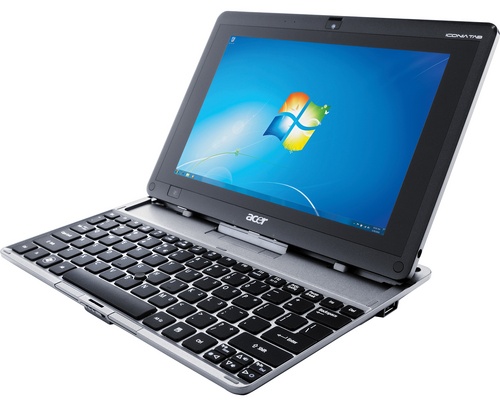
We knew we needed at least one full version of Windows with us, and this worked out pretty well. We had one mishap in Umbria which cracked the keyboard and cost us the control key, but now that we are home, we can put the keyboard away and just use it as just a tablet, because it is no longer our primary computer. Being able to ditch the keyboard was also useful for daytrips; At 3 lbs, it wasn’t the lightest thing we could have found, but if you leave the keyboard, it was only 1.7, and you have everything you care about with you. In many places we stayed, we felt the need to take all crucial items, like computer and passports, with us when we went out.
The touchscreen is pretty great if all you want to do is read, but the keyboard is essential.
2nd internet device – Jack’s old iPhone 3GS
I got the phone in July of 2009 and used it for over 2 years, and I was very happy to make it through the trip with it still going strong. I cracked the screen (for the third time) while packing up in Boston, but by that time I was so used to replacing it I was able to fix it the night before we left on the trip. It was very necessary in keeping the peace between Cari and me. Imagine that you have been walking around all day, or maybe you’ve been on a farm with no connection for awhile, and you have just gotten to your hostel. You want to check your email, check on the Mariners, and see if anyone has commented on the blog. Are you really going to … share… the internet? Not in this marriage.
I took the SIM card out of the phone before leaving, which turned it into an iPod touch- but we found lots of places with unexpectedly unlocked WiFi networks. The most surprising: The small train station in Aqui Terme, Italy.
A lot of the websites which were instrumental in trip planning also had free apps available in the app store, which allowed me (and it usually was me) to contribute something productive to planning while Cari used the real computer.
Galileo: This free application let us pre-load a map into the iPhone before we went to a city, just by panning around while we had an internet connection. This was probably the single most important tool which we had on the trip: we never had a paper map, and we didn’t really need one. It as also well worth the $1.99 add-on that let us drop pins on the map.


Booking.com: This was our favorite way to get lodging, and we used it everywhere we went. Plenty of cheap options, and, unlike other sites, they list the entire price for the whole stay, which somehow is way less annoying than seeing the price per person per night. Airbnb.com and 9flats.com are also worth checking for nicer lodging, especially for small groups.
Kayak.com: Seems to find the cheapest international tickets, and the iPhone app saves all of your previous searches, which is great when you have no set schedule or even itinerary, but just want to find a cheap permutation of flights to get back home, eventually.
E-readers – 2x Kobos

Cari was able to pick up two of these very basic e-readers at the Borders going-out-of-sale in Boston prior to our trip for around $40 each. We had done some quick research and, at the time, they were about as omnivorous as you could find when it came to the types of files they supported (along with Sony e-readers). The two leading brands, Nook and Kindle, both came with more restrictions and client software. With the Kobos, we were able to throw e-books on using Windows Explorer, and we each had way more than we could read during the trip.
Camera – Samsung HZ35W (or WB650)
I spent a lot of time researching cameras before we left, with something very specific in mind: I wanted a GPS camera with which we could bring up and look at a stored map. This was part of the plan for going map-less and GPS-less. I read a lot of camera reviews, and this was the only camera which seemed to fit the bill. There are a lot of GPS cameras, but this, as far as I could tell, was the only one which let you load a map into it before you set out.
Of course, you actually have to load the map in for it to be useful to you. We never used it in France. After Italy, I didn’t bother to update the files, so we were never able to use it again. But one glorious night, in Umbria, we were lost and I used the camera to figure out where we were. It makes it all worthwhile.
Of course, even if I wasn’t good about loading the maps, our pictures still all have their location data attached, which is pretty cool.
(those pins in the Gulf of Guinea are… wrong)

The camera lens cover started having issues in the Sahara (maybe it got some sand in it). So we had to deal with flicking it open manually the last two months of the trip. As soon as we got home, we sent it back in, figuring it was an easy fix (it was still under warranty). But now they tell us that a refund check is coming! Let the camera researching begin anew!
Plug Adapter – Kensington K33346US

For $25, this served to turn any wall-plug into any other wall plug, or a USB socket. The USB socket part broke about halfway through the trip, but the rest worked as it was supposed to, so we were happy with it.
Cari made me write this post.
Thanks for the tech tutorial. It helps the rest of us dream on.
ReplyDeleteSteve
I should also mention that halfway through the trip we had to buy a small external harddrive because we couldn't store all of the pictures we took on our netbook.
ReplyDelete